

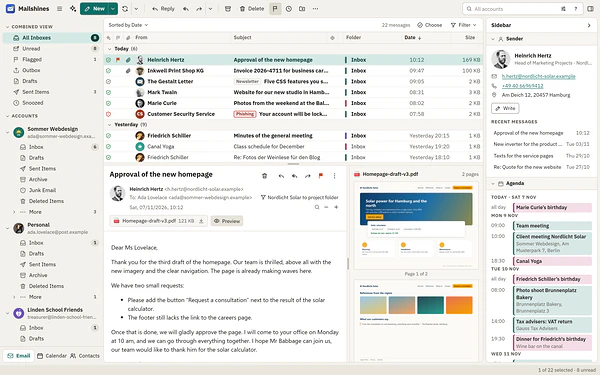
Desktop app
Mailshines runs only on the computer where you install it, and only while the desktop app is open. This is the right choice for a single workstation or laptop.
New in the Microsoft Store The email program for the office, the family, and the club
On your own computer or centrally as a local server for all devices
Mailshines brings any number of email accounts, calendars, and address books together in one program. It runs as a desktop app on one workstation or as a server in the office or at home. Desktop apps and browsers then access it from any device on the local network.
The first public version is the desktop app for Windows 10 and 11. The server for all devices and the versions for Linux and macOS will follow.
 Windows Store app
 Linux
 macOS soon
Browsers on PC, tablet, and smartphone
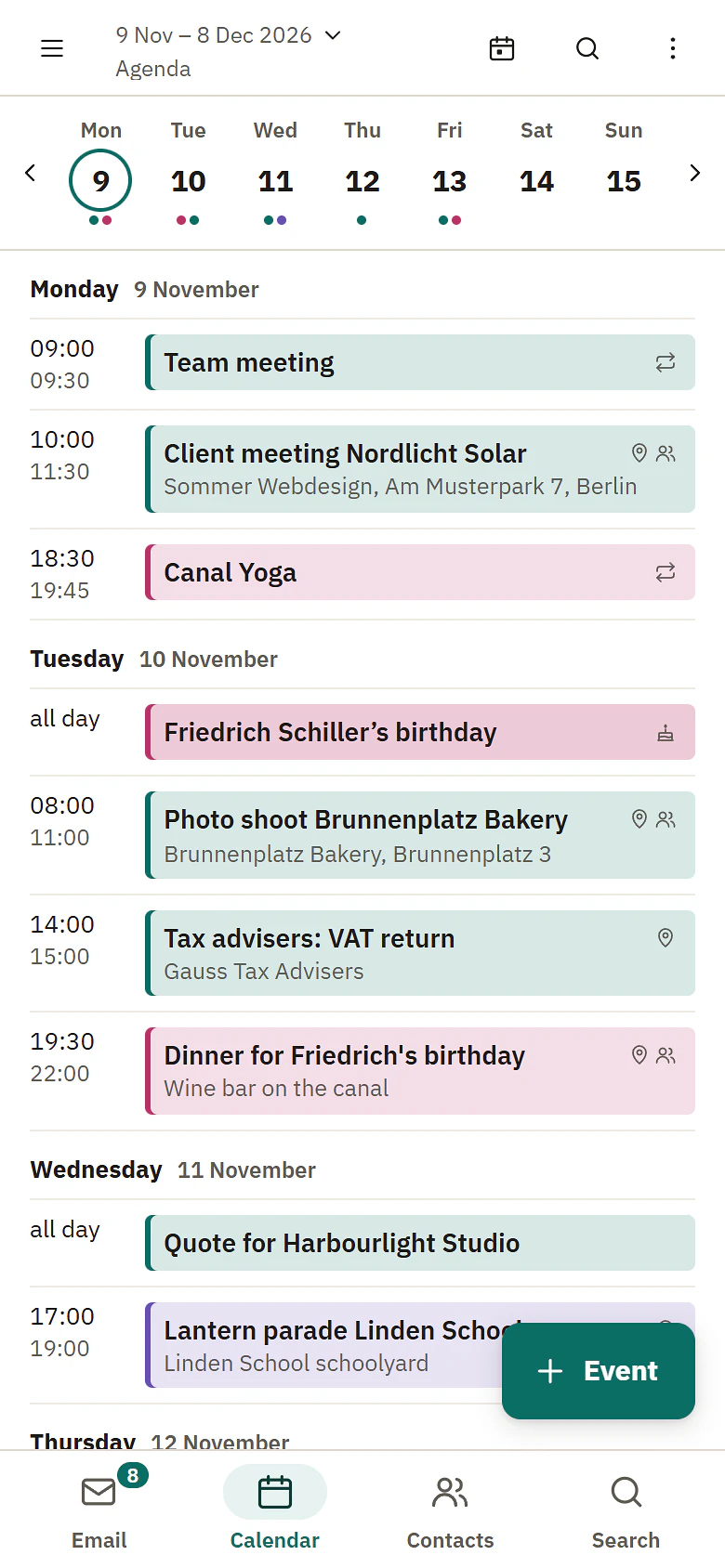
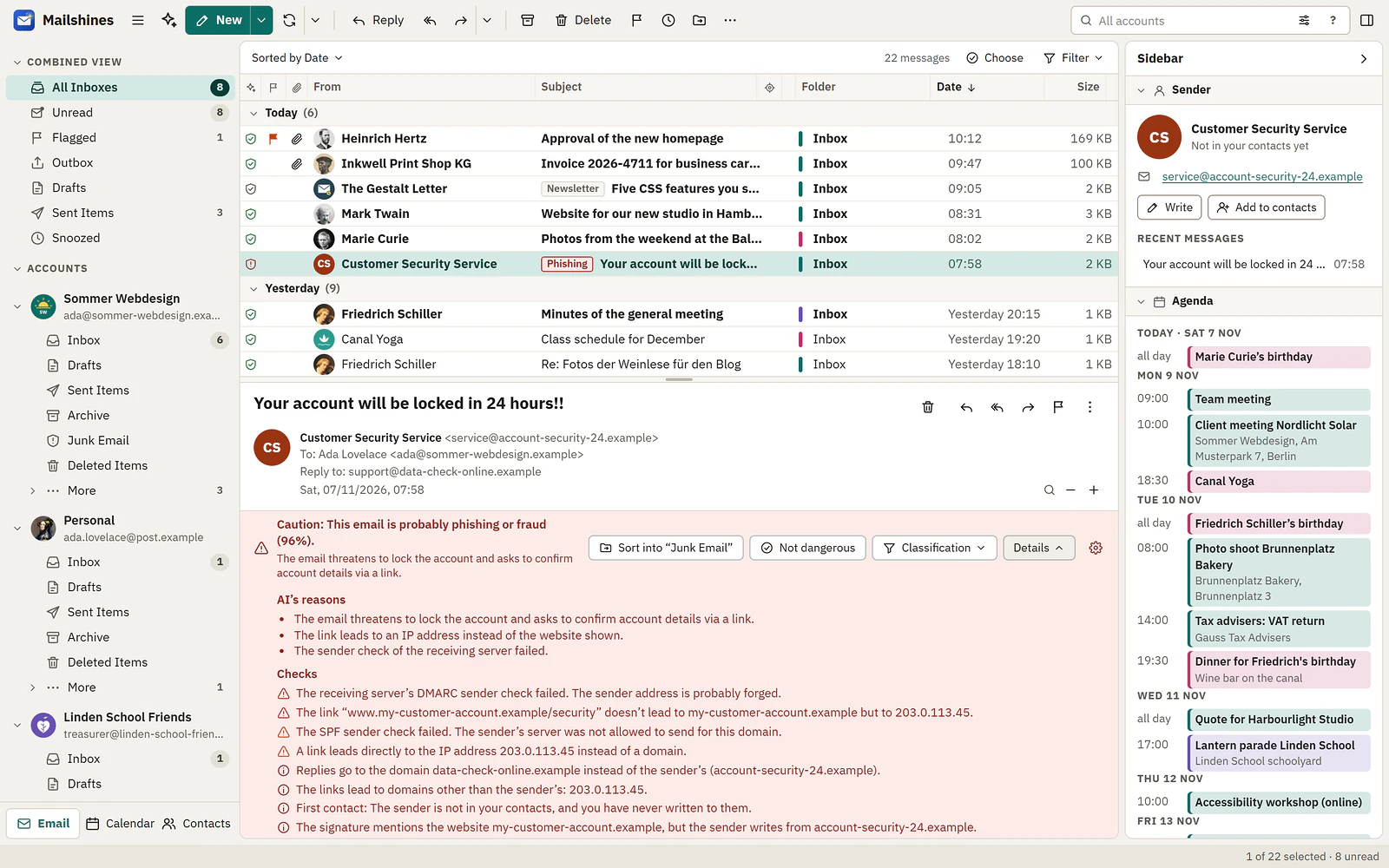
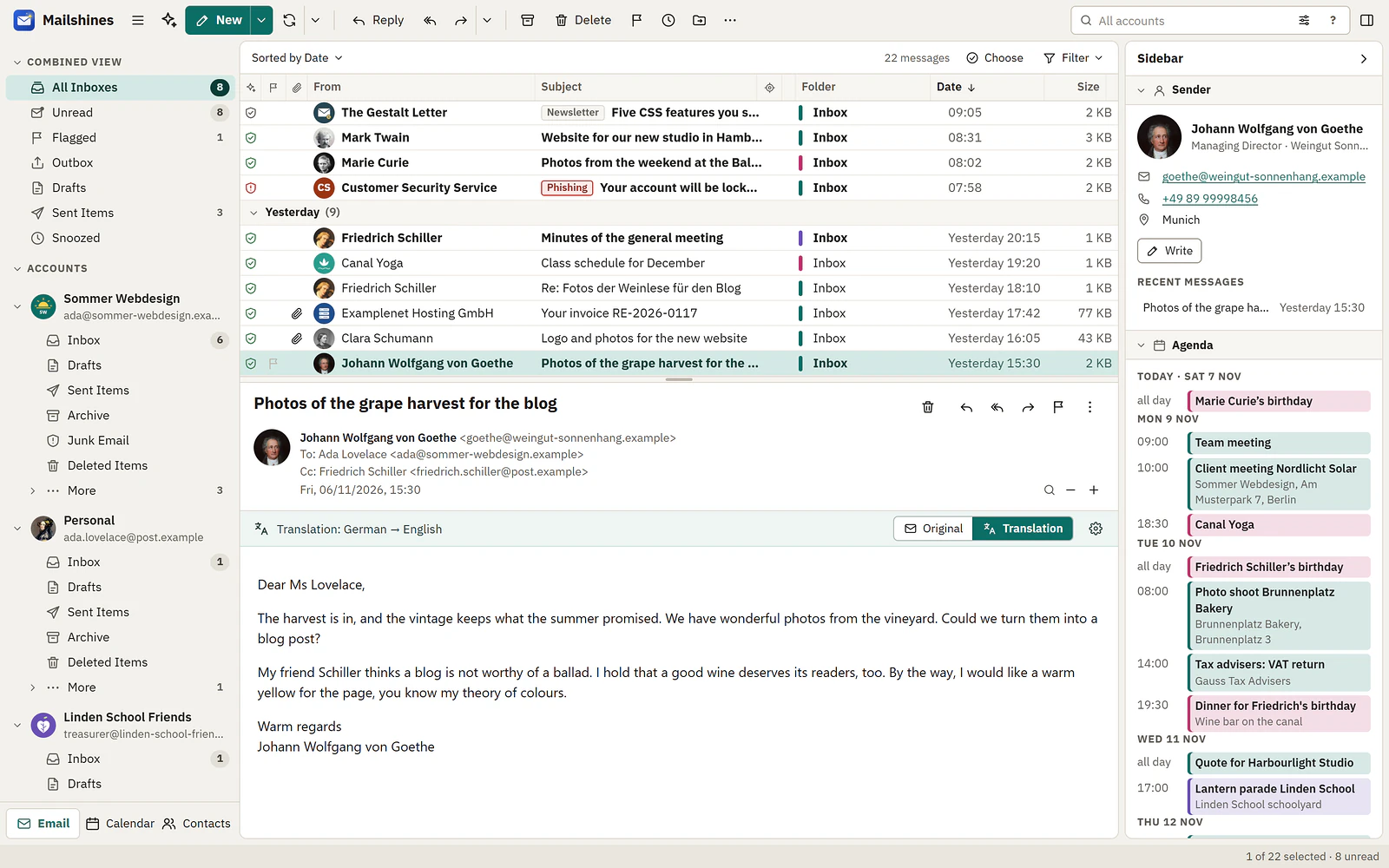
All pictures come from Mailshines. In Ada Lovelace’s fictional web design office, historical figures write to one another, from Goethe to Mark Twain. A click on a tile shows the feature in detail.
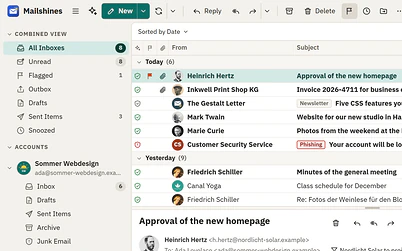
Any number of accounts sit in one account tree. The combined view shows the inboxes and the unread and flagged emails of all accounts together.
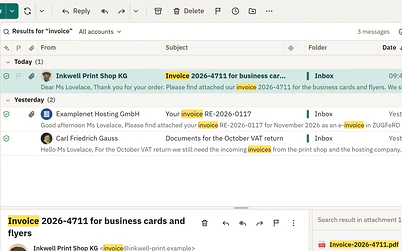
Search shows results as you type, including in the content of PDF attachments and scanned pages. In the subject and sender, it also finds parts of a word.
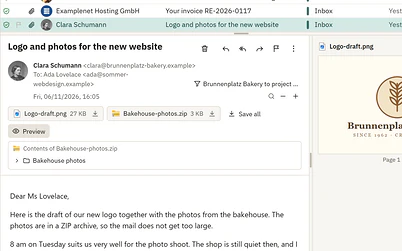
The preview column shows the pages of PDF, image, and Office attachments. You see the contents of ZIP and 7z archives without extracting anything.
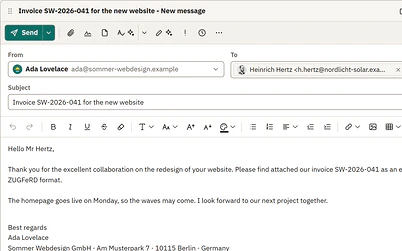
The compose window comes with an HTML editor, signatures for each sender, templates, and a spell checker. If you wish, the email goes out later.
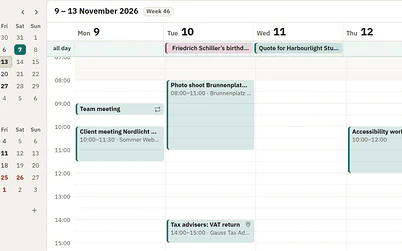
The calendars of all accounts are layered on top of one another, from the day view to the agenda. Mailshines enters birthdays and holidays by itself.
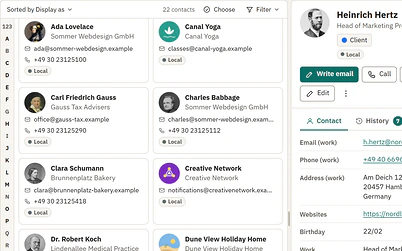
The contacts of all address books are available as a list, as business cards, or as a phone list. For each contact, Mailshines shows the emails and attachments exchanged.
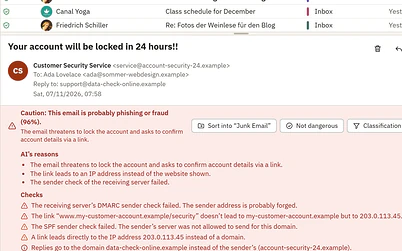
The AI assigns every received email to one of seven categories and gives its reasons. Fixed checks of sender, links, and attachments come on top.
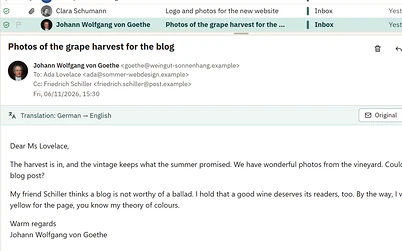
The AI translates emails in foreign languages into your language. Formatting, links, and images are preserved, and one click shows the original again.
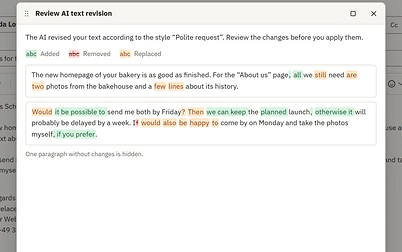
The AI corrects typos and, if you wish, rephrases your text in a business or polite tone. A comparison shows every change before you apply it.
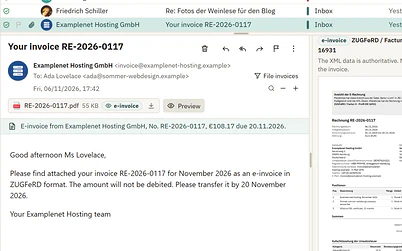
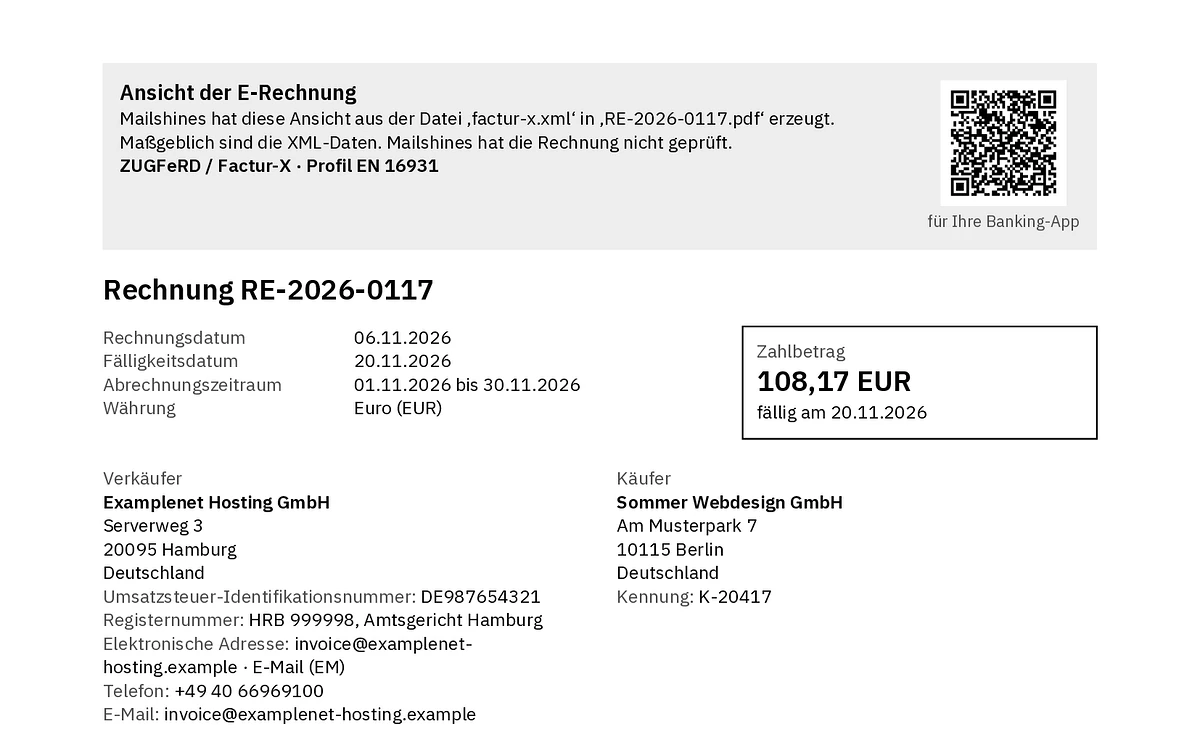
Mailshines recognizes ZUGFeRD, Factur-X, and XRechnung and shows them as a clear document, with a QR code for your banking app.
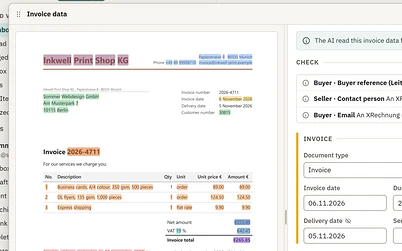
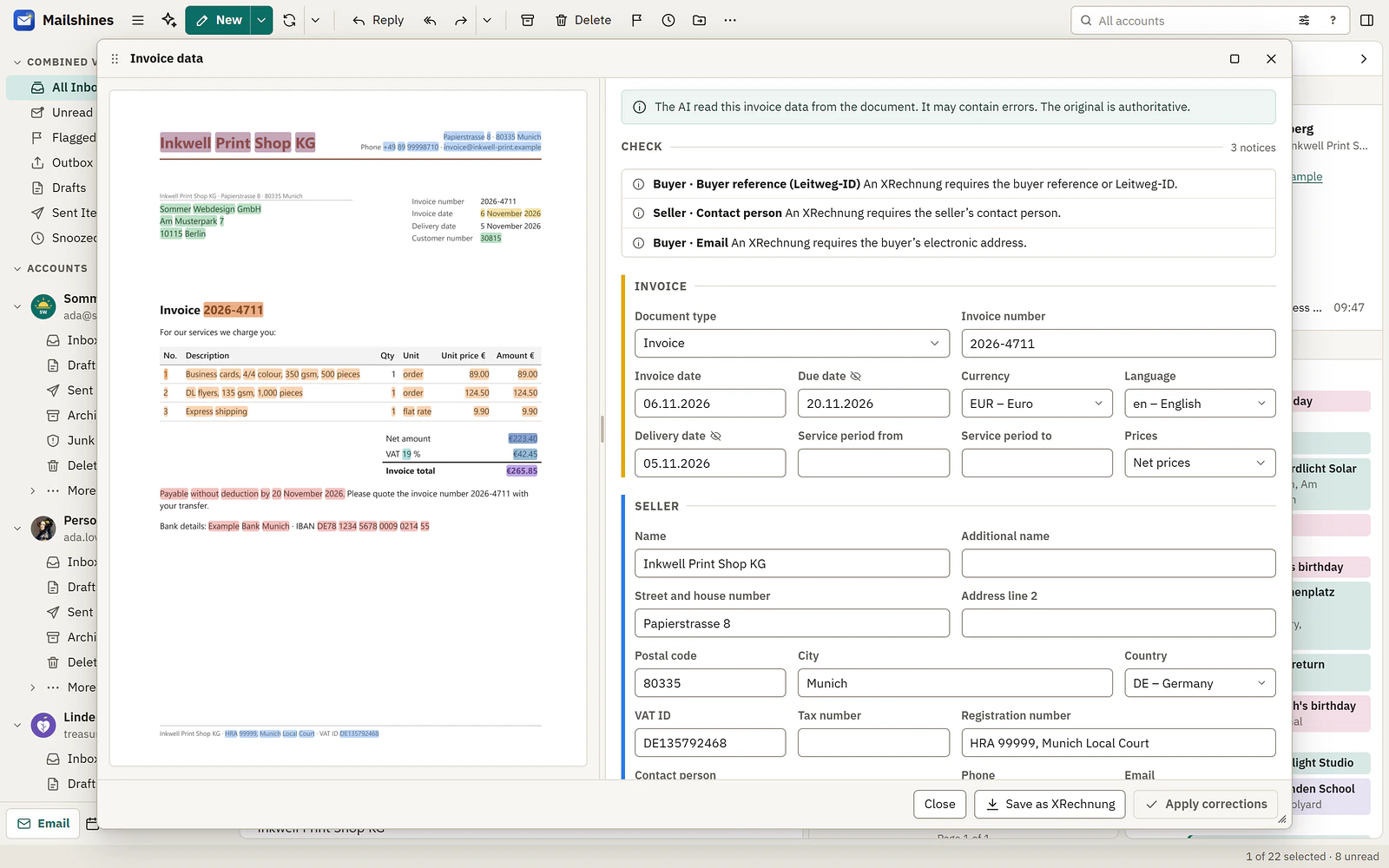
From invoices as PDFs, the AI reads the issuer, line items, amounts, and bank details. For each entry, Mailshines highlights the location in the original.
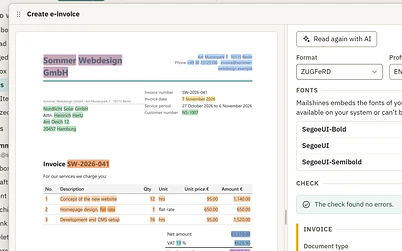
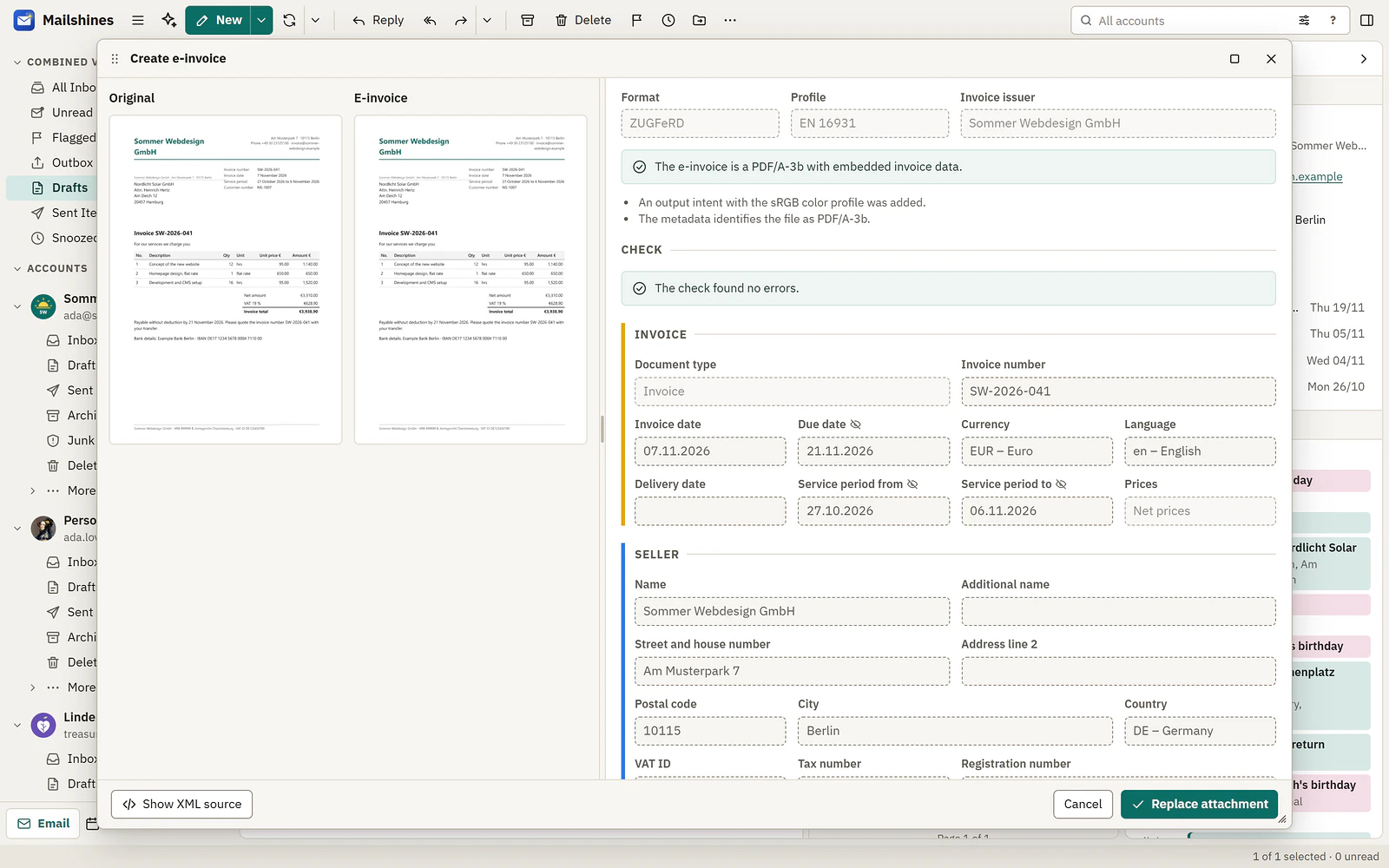
Your own PDF invoice becomes an e-invoice in the ZUGFeRD or XRechnung format while you compose. Beforehand, Mailshines checks mandatory fields and calculation rules.
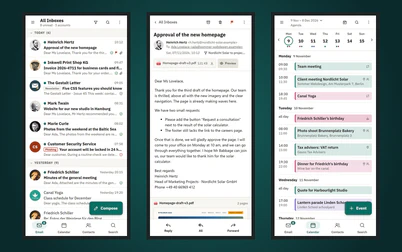
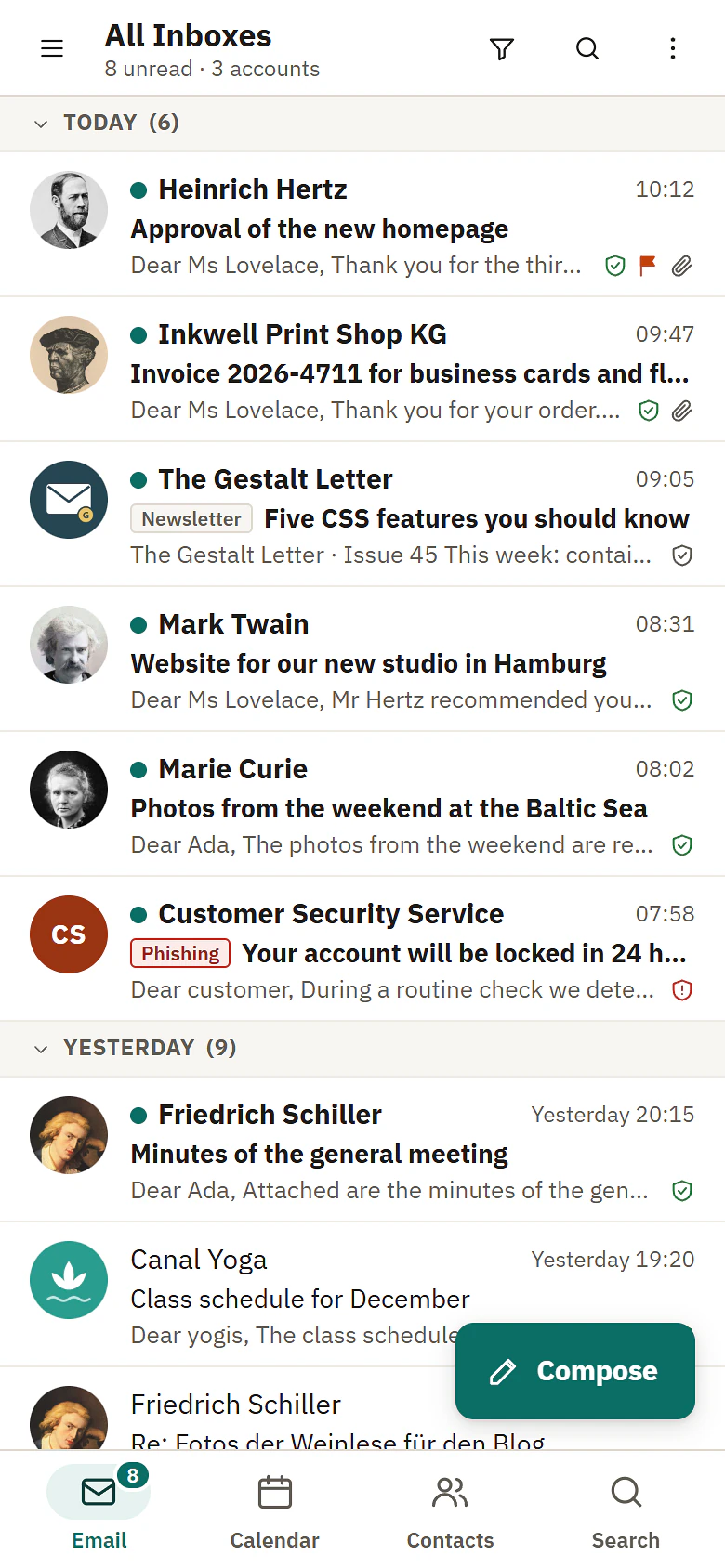
The web interface adapts to the device. On a PC it shows the desktop style, on a smartphone a single-column view with swipe gestures.
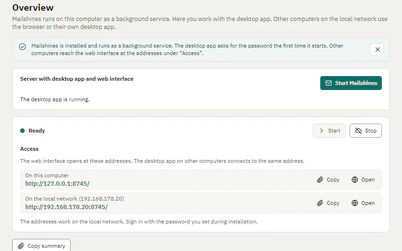
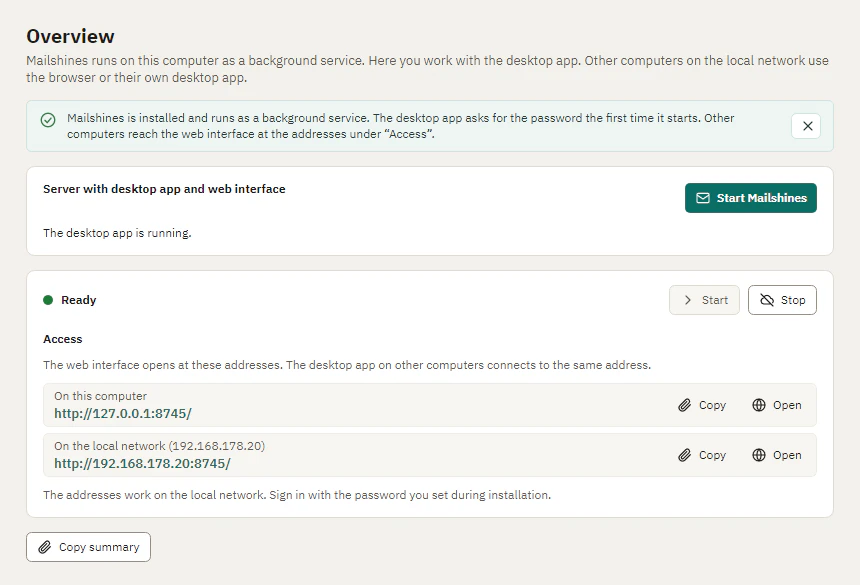
If you wish, Mailshines runs as a service on a computer in the office or at home. All devices on the local network then work with the same data.
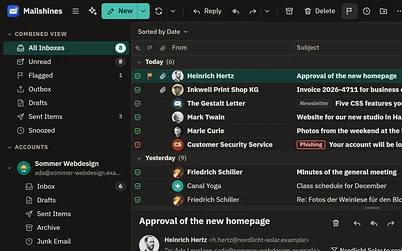
If you wish, the interface follows the operating system setting. Each device remembers its own choice.
Get the desktop app for Windows straight from the Microsoft Store. The server for all devices and the versions for Linux and macOS will follow.
Mailshines can run centrally on a computer in the office or on a home server. Desktop apps and browsers on the local network access it.
The Mailshines service is the heart of the program. It syncs all accounts, stores emails, events, and contacts, searches them, and makes the requests to the AI. The desktop app and browser display what the service delivers and send your input to it.
On an office server or home server, the service runs in the background, on Windows as a Windows service and on Linux as a systemd service, even without a screen. Every change appears right away on all connected devices. If someone reads an email on a smartphone, it is no longer bold in the desktop app a moment later.
The server belongs to you and normally runs locally in your network, not in someone else’s cloud. On the go, you connect to your network by VPN. Running it on the internet will soon follow as an option, for example to make access easier for smartphones on the go.
The InstallManager sets up Mailshines in one of four variants, verifies the authenticity of every downloaded file, and later updates Mailshines at the press of a button. After a server is installed, it shows the addresses at which the other devices on the local network reach Mailshines.
On a Linux server without a screen, the InstallManager runs in the terminal:
sudo ./Mailshines.InstallManager-…-linux-x64 --console install
In normal operation, the InstallManager opens the firewall only for private networks, that is, for your office or home network.
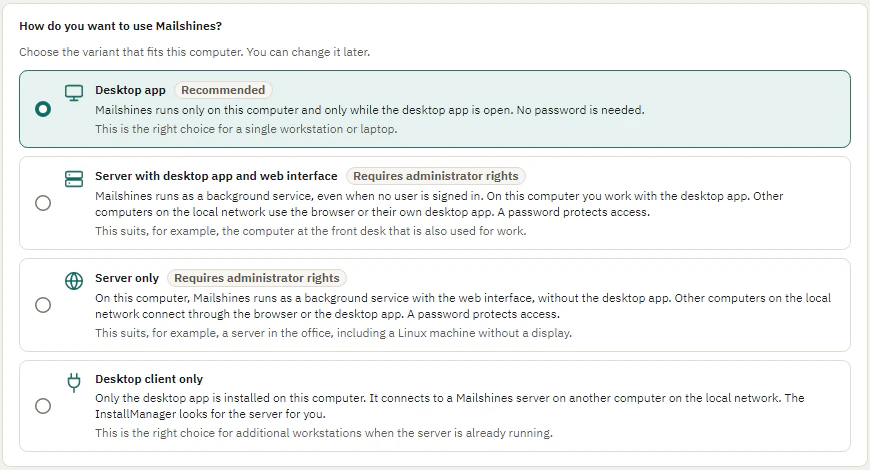
Mailshines runs only on the computer where you install it, and only while the desktop app is open. This is the right choice for a single workstation or laptop.
Mailshines runs as a background service. On the server itself, you work with the desktop app; other computers use the browser or their own desktop app.
Mailshines runs as a background service with a web interface, without the desktop app. This suits, for example, a server in the office, including on Linux without a screen.
Only the desktop app is installed on the computer. It connects to a Mailshines server on the local network. This is the right choice for additional workstations once the server is running.
In the smartphone’s browser, Mailshines shows an interface of its own, in a single column with a bar for email, calendar, contacts, and search. A swipe right marks an email as read or unread, and a swipe left reveals the buttons for archiving and deleting. No app from a store is needed for this.
You handle settings and account setup on a PC, in the desktop app or in the browser in desktop style.
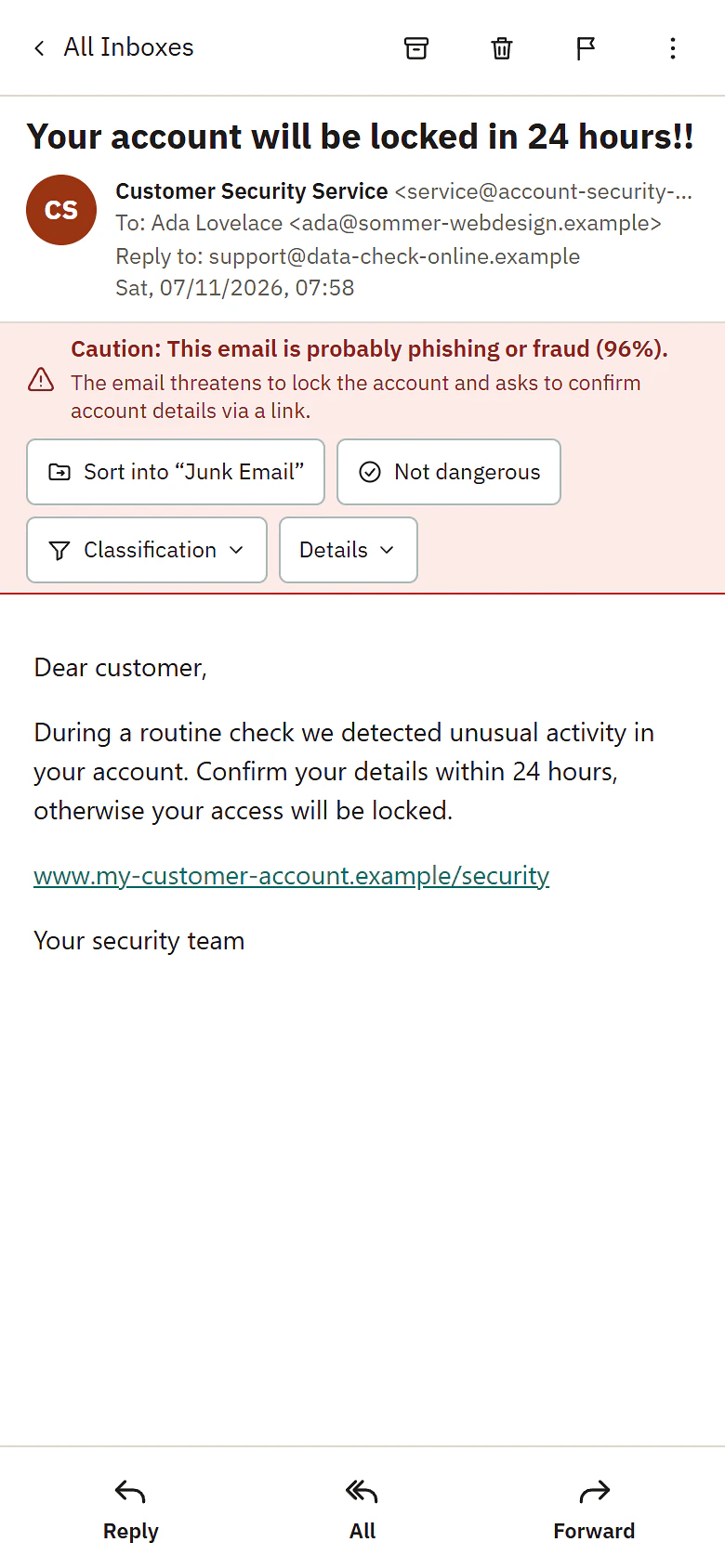
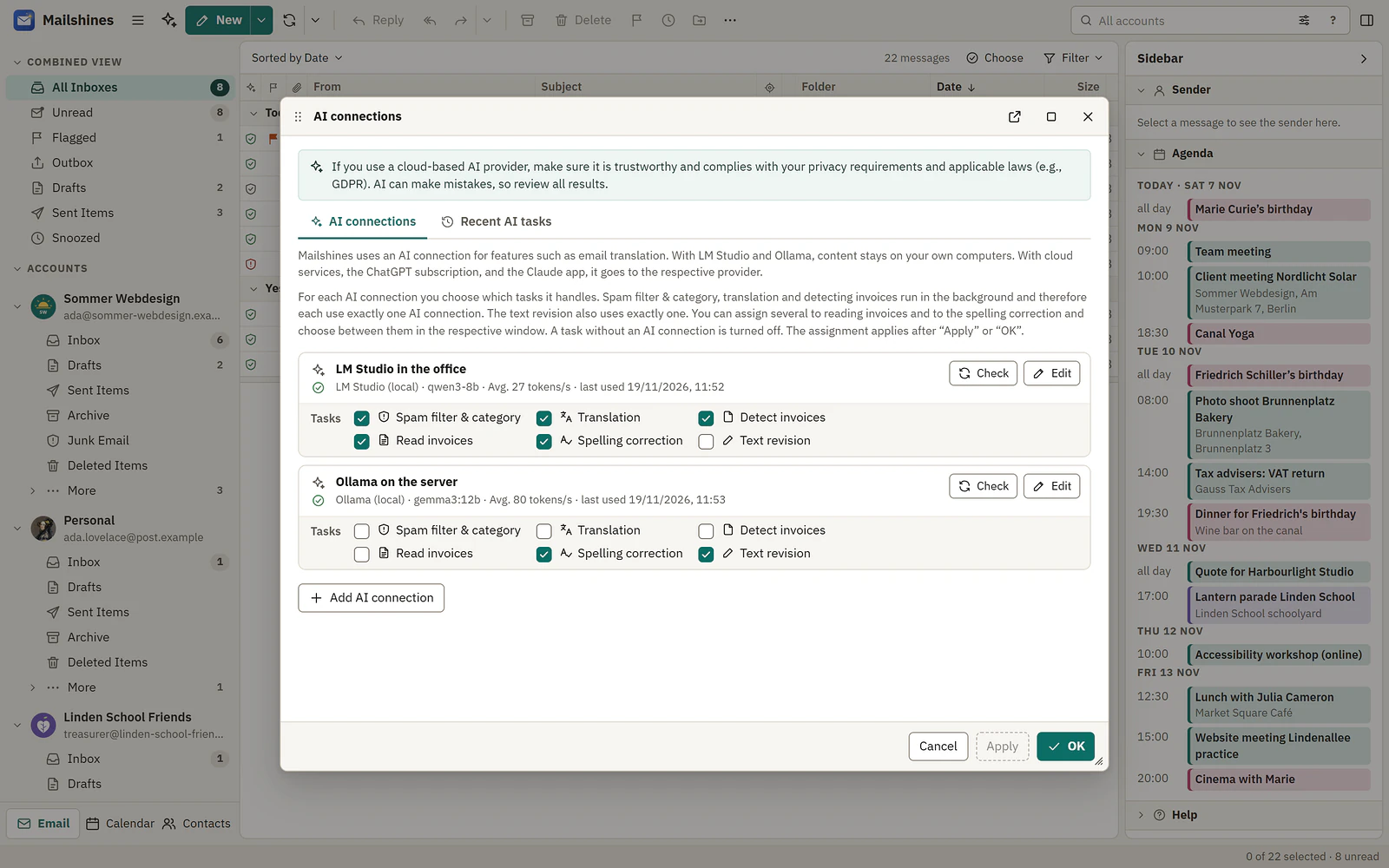
All AI features are turned off by default. You decide whether Mailshines uses an AI and which one.
Mailshines works with local language models through LM Studio or Ollama, on your own computer or on another computer on the network. Then the content stays with you. Alternatively, it uses your ChatGPT or Claude subscription or a cloud service such as OpenAI, Anthropic, Google Gemini, or Mistral. Each AI feature can use its own AI connection.
With a server installation, the Mailshines service makes the requests to the AI. This way, all devices use the same AI, including the smartphone.
AI can make mistakes. That is why Mailshines labels every AI result. Classifications and invoice data can be corrected, and for translations one click shows the original. You see corrections and revisions in a comparison before they reach your text.
Mailshines displays received e-invoices in readable form, turns PDF invoices into structured data, and creates your own e-invoices.
Mailshines recognizes an e-invoice in the ZUGFeRD, Factur-X, or XRechnung format in the attachment by itself. It shows it as an easy-to-read document with all line items, totals, and bank details. A QR code in the GiroCode format transfers the payment to your banking app.
The AI reads invoices without embedded data. For each entry, Mailshines highlights the location in the original, and the data can be saved as an XRechnung. Mailshines reads embedded invoice data without AI.
Mailshines converts your own PDF invoice into an e-invoice while you compose, as ZUGFeRD in the PDF/A-3b archive format or as an XRechnung. Before creating it, it checks mandatory fields and calculation rules. Your company’s master data fills in missing details and never goes to the AI. Without AI, an XML file serves as the source, or you enter the data by hand.
Mailshines displays received e-invoices but doesn’t check them for validity. The embedded invoice data remains authoritative.
This is what sets Mailshines apart from an ordinary email program.
Emails, events, and contacts are stored entirely on your computer or server. Mailshines doesn’t collect usage data.
Even without internet, all emails, events, and contacts are there, because Mailshines keeps a complete copy on your computer or server. What you change offline, it transfers once the network is back. Browsers and desktop clients do, however, need the connection to the server.
The Mailshines service runs centrally, also as a Linux service. Desktop apps and browsers on the local network show the same state.
The AI features are off by default. With LM Studio or Ollama, they work entirely on your own computers, with no cloud. Each feature can use its own AI.
Mailshines displays e-invoices in readable form, reads PDF invoices with AI, and creates ZUGFeRD or XRechnung from your own invoices.
Fixed aliases and catch-all addresses are full-fledged senders. When you reply, Mailshines picks the address the email was sent to.
Mailshines shows images in emails as newly generated copies, and external content such as tracking pixels stays blocked. The preview of foreign documents is created only in isolated processes.
Even folders with 200,000 emails scroll smoothly. Search shows results as you type.
IMAP, SMTP, POP3, CalDAV, CardDAV, and Sieve connect Mailshines with the common providers. Import and export work through EML, MBOX, ICS, vCard, and CSV.
Mailshines runs as a desktop app or as a server. You use it in the desktop app or in the browser.
Mailshines runs on Windows 10 and 11 on computers with an x64 processor from Intel or AMD. The desktop app for a single workplace is available in the Microsoft Store. The InstallManager sets up the server and further workplaces.
Mailshines runs on Linux on computers with an x64 processor, for example from Ubuntu 20.04 or Debian 11. The InstallManager sets up the desktop app and server, and the server also as a service on computers without a screen.
The desktop app for macOS will follow soon. Until then, on a Mac you work in the browser with your Mailshines server on Windows or Linux.
The web interface runs in current versions of Chrome, Edge, Firefox, and Safari, including on the iPhone and on Android. It comes from your own Mailshines server, which normally runs locally in your office or home network, not in someone else’s cloud. Running it on the internet will soon follow as an option.
Mailshines comes with all of this.
from:, subject:, and has:attachmentThe page “Mailshines in detail” explains the most important features with pictures from the program.